# 3. Pricing
Source: https://docs.checkypro.com/About/Pricing
### 3.1 Pricing overview
At Checky Pro we believe pricing should be clear, predictable, and fair. Too many providers hide their true costs or add unnecessary platform fees.\
Our model is different: we separate Checkout and Payments, so you always know exactly what you are paying for.
### 3.2 Checkout Pricing
Our Checkout gives you a branded flow on your own domain, complete with multilingual support, review integration, and full customization.
The cost of Checkout depends on your Shopify subscription plan:
* **Basic plan** → 1.0%
* **Shopify plan** → 0.5%
* **Advanced plan** → 0.4%
On top of this, there is a fixed platform fee of **€5 per week**.
Checkout fees are invoiced once per week via the billing method you have added to your account.
### 3.3 Payments Pricing
Checky Pro Payments allows you to accept cards, wallets, and the most widely used local APMs in the EU and UK.
* **No fixed monthly fees.** All costs are calculated per transaction.
* **No hidden invoices.** Fees are automatically deducted from each transaction before payouts.
### 3.4 How card pricing works: Interchange++
Every card payment consists of three components, together known as the **Interchange++ (IC++) model**:
**1. Interchange fee**\
The interchange fee is paid to the bank that issued your customer’s card. It compensates the bank for handling the transaction and carrying the risk of the payment.
Within the European Economic Area (EEA), interchange fees are capped by law:
* Up to **0.3%** of the transaction amount for credit cards
* Up to **0.2%** of the transaction amount for debit cards
The actual fee depends on the card type (debit, credit, corporate, premium) and whether the card is domestic or international.\
Domestic debit cards are usually the lowest cost, while international or corporate credit cards tend to be higher.
For the most recent details, you can refer to:\
[Visa interchange fees](https://www.visa.com) [Mastercard interchange fees](https://www.mastercard.com)
**2. Scheme fee**\
The scheme fee goes to the card network (Visa, Mastercard, etc.) and covers the cost of running the global payment infrastructure.
**3. Processor markup**\
This is the **Checky Pro fee**. It allows us to provide the technology, fraud protection, and support required to process your transactions securely.
With **Interchange++**, you can clearly see how the total cost of each card payment is structured.\
It is not a hidden “all-in” number, but a transparent breakdown of the real underlying costs plus the Checky Pro service fee.
### 3.5 Putting it all together
* Checkout fees are billed weekly (**€5 plus a percentage based on your Shopify plan**).
* Payments fees are deducted automatically from each transaction.
This hybrid approach gives you predictable weekly billing for Checkout, combined with transparent per-transaction settlement for Payments.
The result is **full control over your costs and no hidden surprises.**
# 4. Security & Compliance
Source: https://docs.checkypro.com/About/Security-compliance
### 4.1 Security & Compliance Overview
Handling payments is more than just processing transactions. It requires protecting sensitive data, complying with strict regulations, and partnering with fully licensed institutions.\
At Checky Pro, security and compliance are not add-ons — they are the foundation of our platform.
### 4.2 PCI DSS & Data Security
Checky Pro is fully aligned with the PCI DSS standard (Payment Card Industry Data Security Standard).\
This global standard sets strict requirements for how cardholder data must be processed, transmitted, and stored.
* All sensitive payment data is encrypted and tokenized.
* Customer card details never pass through your servers.
* Our systems are regularly monitored and tested against PCI DSS controls.
Learn more in our Data Security Policy.
### 4.3 KYC & KYB Verification
To protect both merchants and customers, we apply Know Your Customer (KYC) and Know Your Business (KYB) checks during onboarding.\
These are mandatory under EU and UK financial regulations and include:
* Verification of company registration and structure
* Identification of all Ultimate Beneficial Owners (UBOs)
* Validation of linked bank accounts
* Screening against financial crime and sanctions lists
This process ensures that every merchant on Checky Pro operates within a trusted and compliant framework.
See Onboarding & Verification for full details on required documents.
### 4.5 Acquirer Partners & Licensing
Checky Pro works with a network of regulated acquirer partners across the European Union and the United Kingdom.\
These partners are fully licensed financial institutions, supervised by local regulators such as the Financial Conduct Authority (FCA) in the UK and equivalent authorities in EU member states.
By working with multiple acquirers, we ensure:
* Geographic coverage – payments can be processed and settled locally across Europe and the UK.
* Regulatory oversight – all processing flows are subject to supervision under European and UK law.
* Stability and trust – merchants benefit from the safeguards of established financial institutions.
For more details, see our Compliance Overview and Licensing & Acquirer Partners.
### 4.6 Fraud Prevention & Risk Management
Payments come with risks — fraud, disputes, and chargebacks.\
Checky Pro provides a set of tools to help merchants manage these risks effectively:
* Real-time chargeback alerts so you can act before disputes escalate
* Automated dispute handling that generates complete evidence packages for you
* Rolling reserves applied transparently when needed, with clear communication and regular reviews
* Risk monitoring that scales with your growth, rather than capping your volume
Learn more about how we handle disputes in Chargebacks & Risk Management.
### 4.7 Privacy & GDPR
Checky Pro fully complies with the General Data Protection Regulation (GDPR).\
We only collect and process personal and business data necessary for providing our services and meeting regulatory requirements.
* Data is never sold or used for third-party marketing.
* Merchants receive a clear Data Processing Agreement (DPA) upon onboarding.
* Information is stored securely within the EU.
Read our Privacy Policy and Data Processing Agreement for full details.
### 4.8 Our Commitment
By combining strong internal security with partnerships across licensed European and UK acquirers, Checky Pro ensures that every transaction is processed within a safe, compliant, and transparent environment.
We give merchants the tools to grow quickly, while ensuring the trust of their customers and the oversight of regulators.
Next: See how our Technology connects Checkout and Payments into one streamlined system.
# 5. Technology & Infrastructure
Source: https://docs.checkypro.com/About/Technology
### 5.1 Technology & Infrastructure Overview
Checky Pro is built to give merchants full control over their checkout and payments, while ensuring that everything runs reliably at scale.\
Our technology is designed for e-commerce brands that want flexibility, speed, and transparency without the complexity of managing multiple providers.
### 5.2 Architecture
Our platform is built around two tightly integrated components:
* **Checkout** – a customizable checkout flow that runs on your own domain. You can configure design, languages, trust elements, and review integration while order data syncs seamlessly from your store.
* **Payments** – a fully managed payment gateway connected to multiple licensed acquirer partners in the EU and UK. Payments are processed through regulated financial institutions, ensuring compliance and stability.
These two parts work together as a single flow: your customer completes the order in your branded checkout, while transactions are processed securely and reported back to your store in real time.
### 5.3 Shopify Integration
Most of our merchants use Shopify, so we built a custom integration to make setup as simple as possible.
* **Custom App** – You install the Checky Pro app directly in your Shopify store. The app connects products, orders, and customer details with Checky Pro Checkout.
* **Order Synchronization** – When a customer enters the checkout, all relevant data (cart, shipping details, customer info) is transferred in real time to Checky Pro. This ensures that the checkout is prefilled and accurate.
* **Custom Checkout Page** – Instead of Shopify’s default checkout, the customer is directed to your own Checky Pro checkout page (e.g. checkout.yourstore.com). Here you have full control over branding, languages, and additional features.
* **Payment & Status Updates** – Once the payment is completed, Checky Pro automatically syncs the status back to Shopify. Orders are updated instantly in your Shopify admin, so fulfillment and inventory remain fully managed within Shopify.
* **Shopify Restrictions** – While Shopify does not allow third-party providers to replace their checkout within Shopify Payments, Checky Pro operates as an external checkout app. This means you can use Shopify for store and order management, but still run your checkout and payments independently.
For step-by-step setup, see Getting Started with Checkout.
### 5.4 Other Integrations
Besides Shopify, Checky Pro works with leading providers and tools that make running your e-commerce business easier:
* **PayPal** – connect your own PayPal account and accept one of the most widely used payment methods globally.
* **Viva Wallet** – settlement and local account support across Europe.
* **Airwallex** – cross-border payments and FX management.
* **Meta Pixel & Google Pixel** – integrated directly into checkout for accurate conversion tracking and analytics.
These integrations are available natively, without the need for extra plugins or custom coding.
### 5.5 Scalability & Performance
E-commerce volumes are dynamic. Campaigns, ads, or seasonal sales can create spikes of thousands of orders per hour.\
Checky Pro is built to handle this without disruption.
* Optimized load times keep the checkout experience smooth and fast on all devices.
* Elastic infrastructure scales automatically with transaction volume.
* Lightweight architecture ensures your customers see minimal friction, even during heavy traffic peaks.
### 5.6 Reliability & Monitoring
Because payments are business-critical, uptime and stability are at the core of our infrastructure.
* 99.9% uptime SLA across checkout and payments.
* Redundant hosting in multiple European data centers.
* 24/7 monitoring with proactive alerts and automated failover.
This ensures that merchants can rely on Checky Pro every day, even under the heaviest load.
### 5.7 Continuous Improvement
Technology is never static. We improve Checky Pro continuously with new features, performance updates, and compliance adjustments.\
Changes are deployed seamlessly without disruption to merchants.
Stay updated via our Changelog and Policy Updates.
# 6. Transparency & Support
Source: https://docs.checkypro.com/About/Transparency-support
### 6.1 Transparency & Support Overview
Checky Pro is built on the principle of clarity.\
Merchants should always know where to find information, what fees apply, and how to get support when they need it.\
This page describes our transparency guidelines and our support process.
### 6.2 Transparency
We keep merchants informed through clear documentation, policies, and regular updates.
* **Pricing** – all fees are listed in our Pricing page.
* **Policies** – you can review our Privacy Policy, Data Processing Agreement, and Compliance Overview at any time.
* **Notifications** – important changes such as payout schedules, reserve adjustments, or required onboarding documents are always communicated by email and reflected in the dashboard.
* **Reporting** – in Reporting & Analytics you can see exactly how fees and payouts are calculated.
### 6.3 Support Process
Merchants can reach our support team directly via email.
**Email address:** [support@checkypro.com](mailto:support@checkypro.com)\
**Response times:**
* Standard questions: within 24 hours on business days
* Urgent payment-related issues (e.g. failed payout, blocked transaction): prioritized with a first response within 4 hours\
**Languages:** English and Dutch\
**Availability:** Monday to Friday, 09:00 – 18:00 CET
All support requests are logged in our ticketing system. You will always receive a ticket number so that you can track the status of your request.
### 6.4 Escalation
If an issue cannot be solved by first-line support, it is escalated internally:
* **Level 1** – Support agent (initial triage and resolution)
* **Level 2** – Technical or compliance specialist (complex issues, onboarding, payouts, chargebacks)
* **Level 3** – Senior operations team (system-level or contractual matters)
Merchants are informed about escalation and expected timelines.
### 6.5 Community & Partners
Many of our merchants also interact with us through partner communities and private Discord groups.\
While these channels are not a replacement for official support, they provide a fast way to get informal help, share knowledge, and stay up to date with product changes.
### 6.6 Service Commitments
* We aim to respond to all merchant emails within 24 hours.
* Urgent issues related to payments or payouts are prioritized.
* No issue is closed until the merchant confirms resolution.
* Policy changes are communicated proactively through email and visible in the dashboard.
# 1. Who are we
Source: https://docs.checkypro.com/About/Who-are-we
### **1.1 Checky Pro**
Checky Pro is the all in one checkout and payments solution designed for modern e-commerce.
Our mission is simple: to give merchants **full control over their checkout and payment experience**, without the restrictions, hidden costs, or compromises that traditional providers impose.
### 1.2 Why we exist
For too long, online merchants have had to choose between flexibility and cost-efficiency. Platforms like Shopify or third-party processors often lock merchants into rigid checkout flows and add-on fees that eat into margins. As brands scale especially those selling internationally these limits only get worse.
At Checky Pro, we believe merchants deserve better. We believe you should **own every step of your customer journey**: from the product page, through a branded checkout, to the moment funds arrive in your account. That philosophy guides every decision we make.
### 1.3 What we built
Our platform consists of two tightly connected components:
* **Checkout** – A fast, customizable checkout experience that lives on your own domain. You decide the look, feel, and languages. You can even display reviews directly in checkout to increase trust. With our free lifetime plan, you can configure and test everything before going live.
* **Payments** – A flexible gateway that supports global cards (Visa, Mastercard), digital wallets (Apple Pay, Google Pay), **and the most widely used local APMs in Europe and the UK** such as iDEAL, Bancontact, and Sofort. Merchants benefit from **fast and transparent payout schedules**, clear reporting, and built-in chargeback protection.
### 1.4 Who we serve
We focus on ambitious merchants who need a payments partner that scales with them:
* **Dropshippers and high-volume sellers** who want to cut unnecessary fees and increase conversion.
* **DTC brands** that care about brand consistency and customer trust.
* **International e-commerce teams** who need local payment options and multi-currency acceptance without juggling multiple providers.
### 1.5 Where we operate
Today, merchants registered in the **European Union or the United Kingdom** can onboard with Checky Pro and immediately start using Checkout and Payments. These are our home markets, and we’re actively working to expand into other regions.
### 1.6 Our promise
Checky Pro exists to help merchants **reduce costs, increase conversions, and grow across borders** without the enterprise-level complexity or price tags. With us, you get transparency, speed, and flexibility built into the foundation of your checkout and payments.
# 2. Why Checky Pro
Source: https://docs.checkypro.com/About/Why-checky-pro
### 2.1 Why Checky Pro
Running an online store today often means working around the limits of platforms and providers: high fees, redirects, and checkout flows you can’t control. Merchants are often forced to compromise: either accept hidden costs or lose flexibility in how they present and process payments.
Checky Pro was built to remove those limits. We provide a single platform that combines a high-converting checkout with a transparent and flexible payment gateway. By unifying these two components, we give merchants full control over the last step of the customer journey without sacrificing margin, speed, or trust.
### 2.2 Checkout
* **Lower costs** – Eliminate third-party checkout fees (up to 2% on Shopify Payments).
* **Branded experience** – Run checkout on your own subdomain with your logo, colors, and copy.
* **Higher conversion** – Multilingual support, trust-building reviews inside checkout, and optimized load speeds reduce abandonment.
* **Flexibility** – Control every element of the flow: fields, languages, and customer communication.
### 2.3 Payments
* **Global acceptance** – Support for Visa, Mastercard, Apple Pay, Google Pay, PayPal, and the most popular local APMs in the EU and UK.
* **Transparent pricing** – Simple IC++ rates with no hidden platform surcharges.
* **Fast, predictable payouts** – Clear payout schedules in EUR, GBP, or USD.
* **Multi-currency support** – Accept payments in dozens of currencies and settle in the one that suits your business.
* **Built-in risk tools** – Real-time chargeback alerts, automated dispute handling, and flexible reserve management.
* **Growth without limits** – No arbitrary volume caps. We scale with you, supporting campaigns, seasonal peaks, and international expansion without freezing funds.
### 2.4 Why it matters
With Checky Pro, you’re not just plugging in another payment provider. You are building a foundation for growth:
A checkout experience that is fully yours, designed to convert and build trust.\
A payment gateway that reduces costs, gives you transparency, and grows as fast as your business does.
By choosing Checky Pro, you gain independence, clarity, and the ability to scale without compromise.
# 43. Company register extract
Source: https://docs.checkypro.com/KYCKYB/Company-register-extract
Upload your official company register extract to verify your business for KYC/KYB approval.
## 431 Overview
As part of the KYB (Know Your Business) process, every merchant must provide a **Company Register Extract** an official document confirming that your business is legally registered and active.
This extract is used to verify the company’s legal details, ownership structure, and registration status.\
It helps ensure that your business information matches what you submitted during onboarding and complies with acquirer and legal requirements.
Depending on your **company type**, the required document may differ slightly.\
Below you can find detailed information for each type of business entity.
## 43.2 Example
Your **Company Register Extract** must be an official registration extract showing your **business name**, **registration number,** and **legal structure**. Registration letters or informal confirmation emails are not valid and will be rejected.
 ## 43.3 Accepted documents
The type of document required depends on your **company structure**:
### Dutch & international companies
#### **Eenmanszaak (Sole Proprietorship)**
* A **KvK uittreksel (Chamber of Commerce extract)** is sufficient.
* The document must clearly show:
* The **company name**
* The **owner’s full name**
* The **registration number (KvK number)**
* The **business address**
* Must be **officially issued** by the Kamer van Koophandel (KvK).
**VOF (Partnership)**
* A **KvK uittreksel** is also sufficient.
* It must list **all partners** and include the **registration number and business address**.
#### **BV (Private Limited Company)**
* Both of the following are required:
1. **KvK uittreksel** (Chamber of Commerce extract)
2. **Notarial deed of incorporation** (Akte van oprichting)
* The KvK extract confirms the company’s registration details, while the notarial deed identifies the legal shareholders and directors.
* Both documents must be official and match the information provided during onboarding.
A **“registration letter”** or **confirmation email** from the KvK is not valid and will be rejected.
If you do not have your KvK extract, you can purchase it directly from the Chamber of Commerce website:\
[https://www.kvk.nl/zoeken/handelsregister-uittreksel-bestellen/](https://www.kvk.nl/zoeken/handelsregister-uittreksel-bestellen/)
### **Additional information: International companies**
Depending on your country, you must submit an **official company registration extract** from the local business registry.
Examples include:
* **Companies House Extract** (United Kingdom)
* **Handelsregisterauszug** (Germany)
* **Business Registration Certificate** (Hong Kong)
The extract must:
* Clearly show your **company name**, **UBO names and ownership**, **registration number**, and **business address**
* Be issued by the official business registry
* Be **in English**, or accompanied by an official English translation
We prefer to receive documents in English whenever available to speed up compliance review.
## 43.4 Rejected documents
The following **cannot** be accepted as a valid Company Register Extract:
* **Registration letters** from the KvK or other business authorities
* **Screenshots** from online databases
* **Old extracts** older than 6 months
* **Documents missing company name or registration number**
* **Unofficial translations** or self-edited documents
**Emails or confirmation messages** stating that your company is registered
## 43.5 Final notes
A valid Company Register Extract confirms that your business is officially registered and active. It’s a key requirement for compliance and onboarding with Checky Pro’s payment partners.
Before uploading, make sure:
* The extract is **official** and **recent (within 6 months)**
* It includes your **company name, registration number, and address**
* BV companies also attach their **notarial deed**
* The document is **in English** if possible, or accompanied by a translation
Once uploaded, our compliance team will review and verify it directly within your onboarding flow.
Providing a clear and correct Company Register Extract ensures a smooth approval process and helps prevent any delays in your onboarding.
# 37. Overview
Source: https://docs.checkypro.com/KYCKYB/Documentation-overview
This documentation provides a complete overview of the requirements, setup steps, and compliance checks needed to onboard and operate successfully with Checky Pro.
## 37.1 KYB & KYC
Each section is designed to guide you through a specific part of the onboarding or verification process, from website requirements to financial and business documentation. Following these guides ensures a smooth review process with our acquiring partners and helps prevent delays during approval.
## 37.2 What you will find in these docs
**The documentation is structured into clear sections covering:**
* Getting started with Checky Pro and account setup
* Connecting and configuring your checkout and custom domain
* Website compliance requirements, including policies and transparency
* Proof of identity, business address, and company registration
* Proof of bank account and payout verification
* Supplier history and processing history requirements
* Step-by-step guides and practical examples where applicable
Each page explains what is required, why it is required, and how to submit the correct information.
## 37.3 How this documentation helps
This **documentation** is designed to help you complete onboarding as quickly and smoothly as possible.\
\
By following the guidelines and submitting the required information in the correct format, you reduce the risk of **delays**, **rejections**, or **follow-up** requests during review.
Each section explains what is required and how to provide it correctly, allowing our **compliance** and acquirer partners to verify your account efficiently and move your onboarding forward without unnecessary friction.
## 37.4 Final note
This documentation is intended to help you complete onboarding **efficiently** and operate in **full compliance** with card scheme and acquirer requirements.
If you have reviewed all relevant sections and your documentation meets the stated requirements, you can proceed confidently knowing your account is ready for approval and long-term use with **Checky Pro**.
# 45. Processing history
Source: https://docs.checkypro.com/KYCKYB/Processing-history
Provide your processing history to support and complete your KYC/KYB business verification.
## 45.1 Overview
To complete your onboarding, you must provide **Processing History** that shows your company’s past sales and transaction performance.\
This information is essential for our risk and underwriting review it allows our acquiring partners to verify your business activity, transaction volume, and chargeback behavior.
The more complete your history, the faster your account can be approved.\
We prefer to receive **at least 6 months** of processing history, but longer periods are always beneficial.
You may include reports from multiple platforms if they all belong to your company or to the same beneficial owner (for example, multiple Shopify stores, Amazon stores, or [Bol.com](http://Bol.com) accounts).
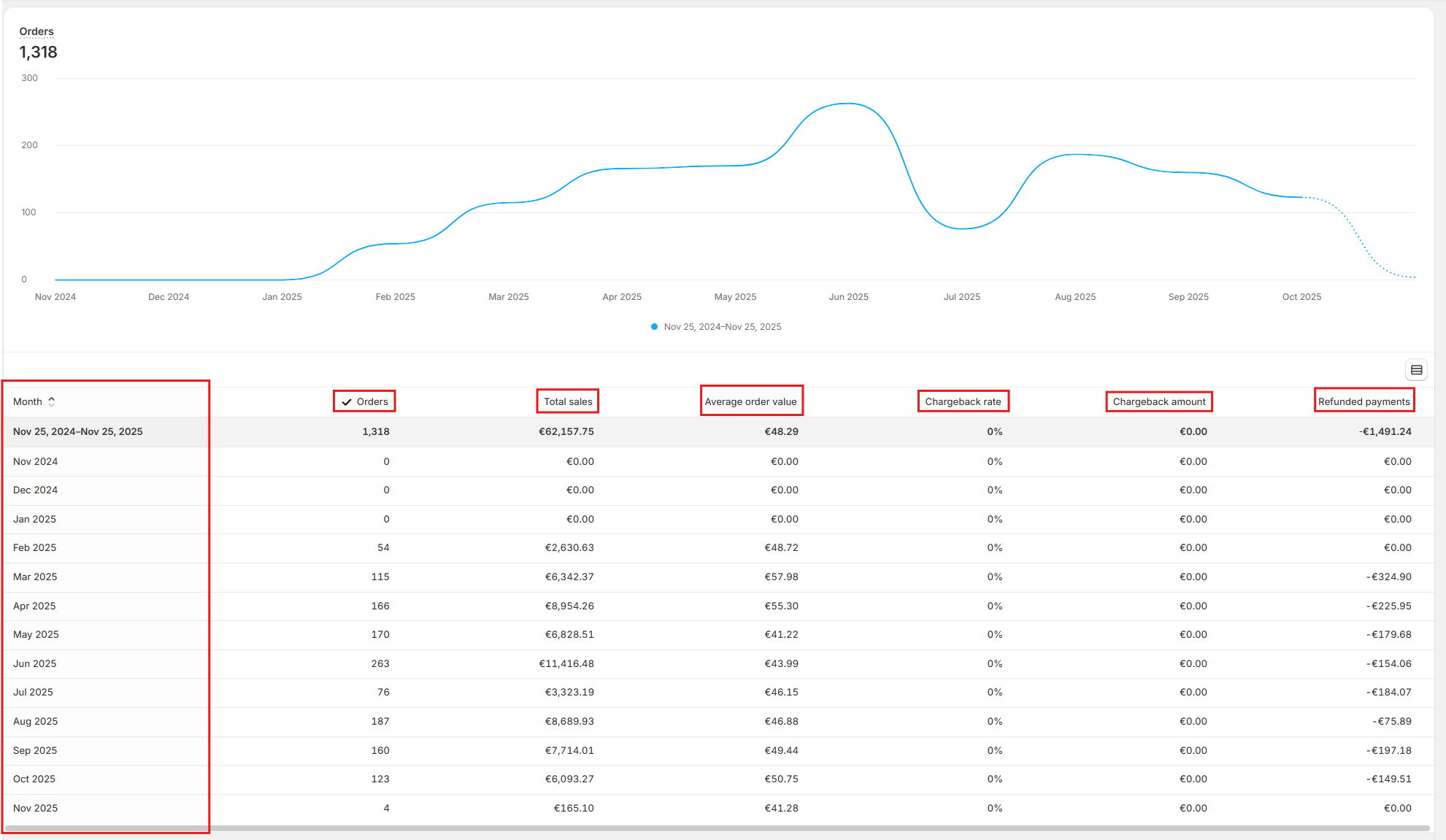
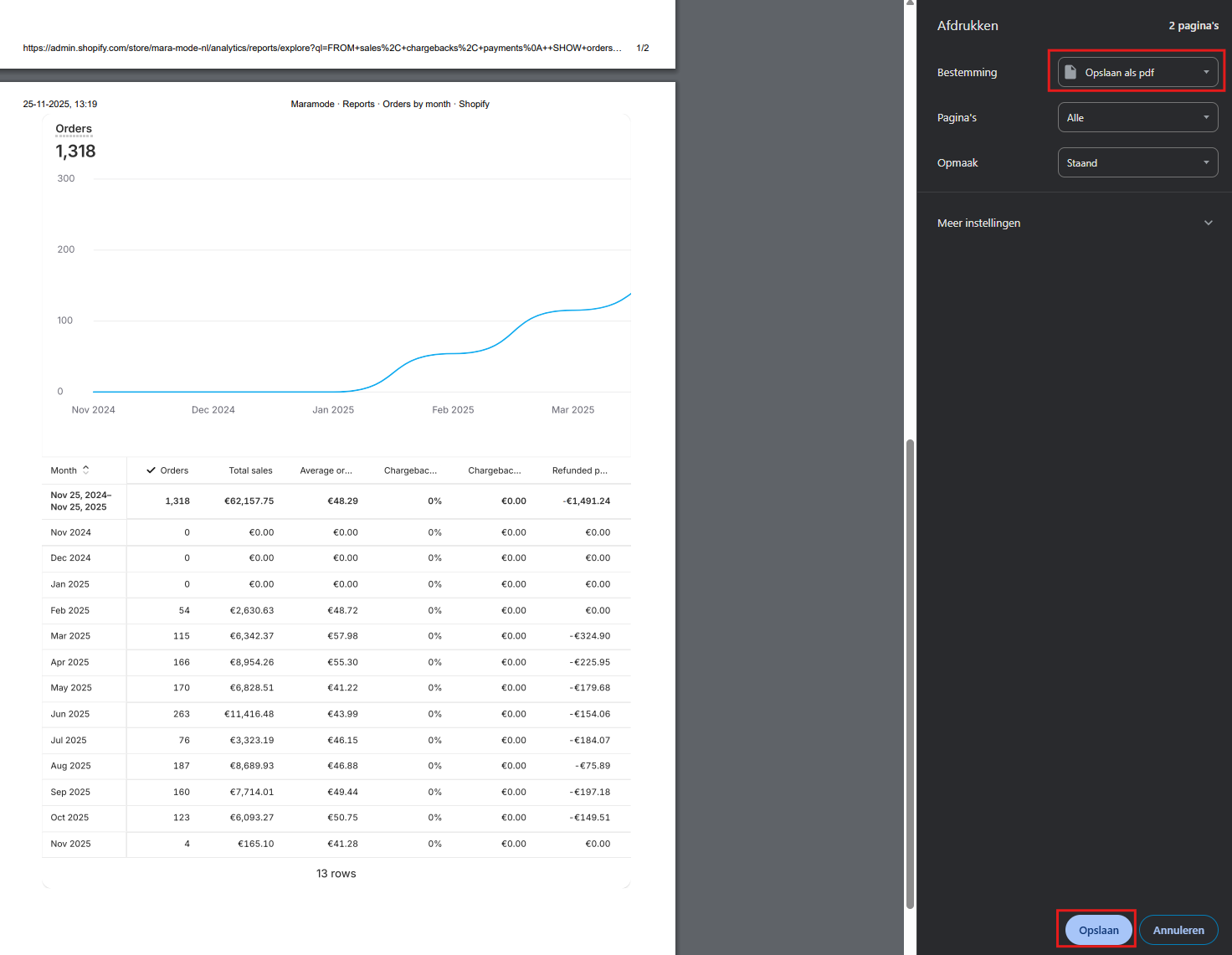
## 45.2 Example
Your Processing History should show total sales, number of transactions, and chargeback rate. All documents must clearly belong to your business and be verifiable under your company or store name.
 ## 45.3 Accepted documents
The following documents are **approved** as valid Processing History:
### Payment provider reports (e.g., Stripe, PayPal, Mollie, Rapyd, Payabl, Adyen)
* Must show:
* **Total transaction volume / turnover**
* **Number of transactions**
* **Chargeback or refund rate**
* **Your company or merchant name**
* Preferably exported in **PDF format** (no Excel or CSV)
### E-commerce platform reports\*\* (e.g., Shopify, [Bol.com](http://Bol.com), Amazon)
* Must show:
* Your **store name or business name**
* **Sales totals**, **order count**, and **refund or dispute rate**
* The platform or account must belong to your **company or UBO**
* Must be **exported as PDF**, not spreadsheets
### Multiple store reports
* Accepted if all stores belong to the same company or individual
* Each report must contain full data visibility (sales, orders, chargebacks)
*The key is visibility: revenue, transaction count, and chargeback percentage must all be included and traceable to your business.*
## 45.4 Rejected documents
The following **cannot** be accepted as valid processing history:
* **Excel or CSV exports** from Shopify or payment providers
* **Screenshots** showing partial dashboards or cropped data
* **Self-created summaries** or manually edited spreadsheets
* **Reports without total sales or chargeback data**
* **Unverifiable stores or unrelated businesses**
*All processing history must be official, verifiable, and complete partial or manual reports will not be accepted.*
## 45.5 How to export "processing report" from Shopify
### **Introduction**
To make it easier for Shopify merchants, we’ve included a quick guide on how to generate a **processing and chargeback report** directly from Shopify Analytics. This report should include all necessary metrics and be exported as a **PDF file**, not an Excel sheet.
### **Step-by-Step Guide**
#### **Step 1: Open Shopify Analytics**
1. Log in to your Shopify Admin.
2. Navigate to **Analytics → Reports** in the left-hand menu.
3. Click **“Create new exploration”** in the top-right corner.
 #### **Step 2: Select Metrics and Report Type**
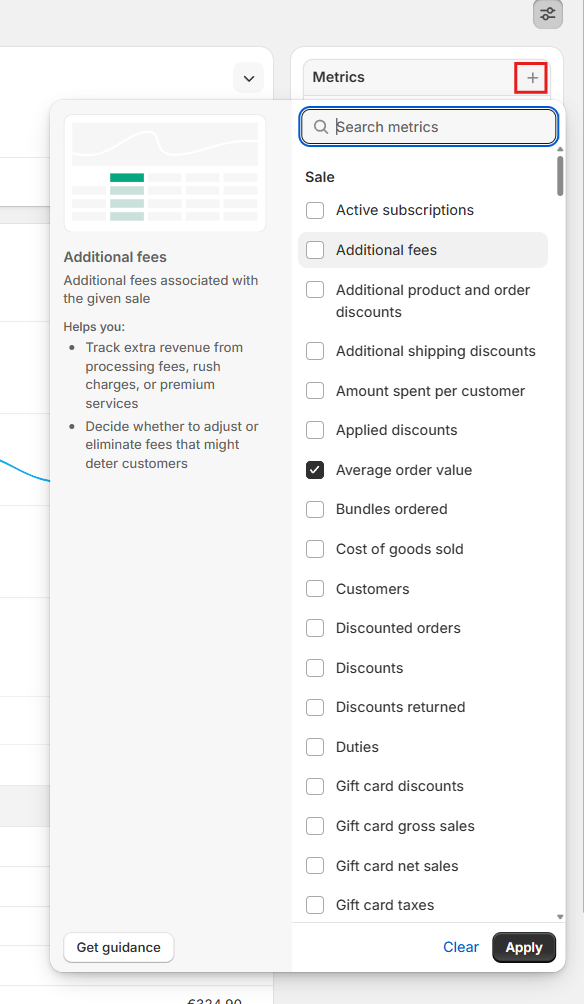
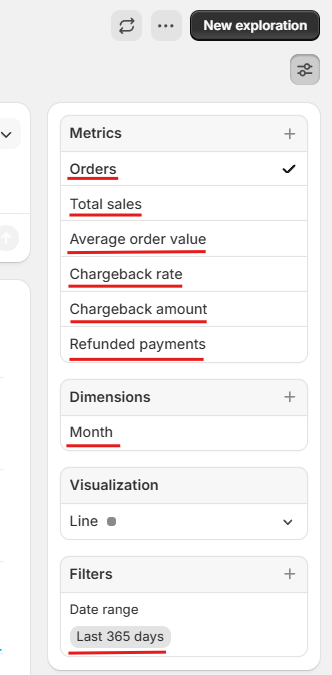
2. In the metrics panel, click **“+”** and select the following:
1. **Total sales**
2. **Orders**
3. **Average order value**
4. **Chargeback rate**
5. **Chargeback amount**
6. **Refunded payments**
3. In the Dimensions panel, click **"+"** and select the following:
1. **Month**
4. Verify that all selected metrics appear correctly in your report view.
 #### **Step 3: Set the Date Range**
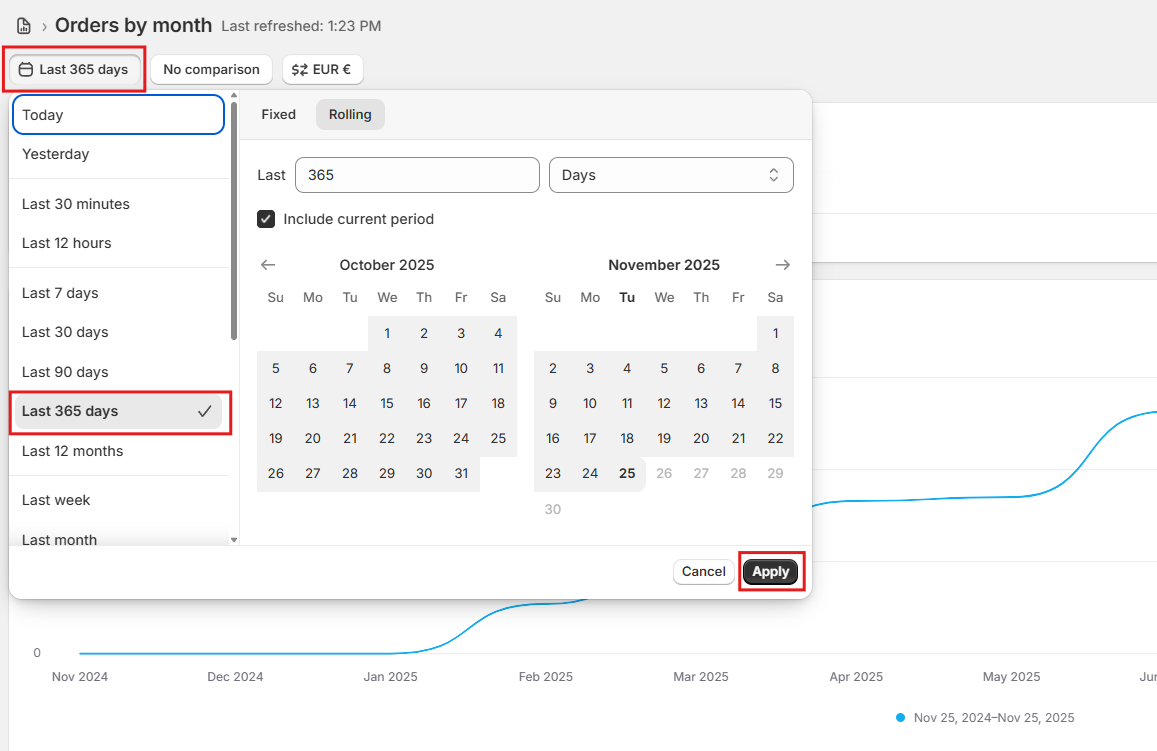
1. In the top-left corner of the report, click on the **date range selector**.
2. Choose **“Last 365 days”** (or select a full year manually).
3. Click **Apply** to load your data.
 #### **Step 4: Run and Review**
1. Click **“Run”** to generate your report.
2. **Review** that your data includes:
* **Total sales**
* **Order**
* **Average order value**
* **Chargeback rate**
* **Chargeback amount**
* **Refunded payments**
***
#### **Step 5: Export as PDF**
1. In the top-right corner, click the **three-dot (⋮)** menu.
2. Select **“Print”**, then choose **“Save as PDF.”**
3. Name the file clearly, for example:\
Shopify\_Report\_\[StoreName]\_\[Month-Year].pdf

 ### **Submission Tips**
* Export reports covering **at least 6 months**, ideally 12 months.
* Make sure totals include **sales**, **transactions**, and **chargeback rate**.
* **PDF format only**, Excel or CSV exports will not be accepted.
* If you manage multiple Shopify stores, export one PDF per store.
## **45.6 Final notes**
Providing detailed and verifiable processing history allows Checky Pro and our acquiring partners to assess your business performance quickly and accurately.
Before uploading, ensure that:
* The report is **official** and covers at least **6 months** of activity.
* It shows **sales totals**, **transaction count**, and **chargeback rate**.
* The store or merchant name clearly matches your company or onboarding data.
* The report is in **PDF format**, not Excel or screenshots.
Once submitted, our compliance team will review your history to confirm legitimacy and performance consistency.\
A strong and transparent processing history significantly improves your approval speed and strengthens your long-term relationship with **Checky Pro**.
# 40. Proof of business address
Source: https://docs.checkypro.com/KYCKYB/Proof-of-address
Upload an official document showing your business address to meet KYC/KYB verification requirements.
## 40.1 Introduction
As part of the onboarding process, every merchant must provide valid **proof of the registered business address**. This requirement ensures compliance with **Know Your Business (KYB)** and **Anti-Money Laundering (AML)** regulations, and confirms that the company operates from a legitimate, verifiable location.
Submitting a clear, recent, and complete document showing the company’s **legal name** and **registered business address** allows our acquiring partners to verify your business quickly.\
Missing, unclear, or outdated documents may lead to delays or rejection during the review process.
## 40.2 Document requirements
Your proof of business address must clearly show your company’s full legal name and registered business address.\
Only official or financial documents are accepted; no informal letters, order receipts, or membership invoices.
### **Accepted Documents**
\
The following documents are **approved** as valid Proof of Business Address:
Screenshots or photos are not accepted under any circumstances.
**Business bank statement**
* Must display the **company’s registered name** and **full business address**
* Must be issued within the **last 3 months**
* uploaded as a **PDF file** for full clarity
**Utility bill issued to the company**
* For example: **electricity**, **water**, or **internet** invoice under the company name
* Must show **both company name and address**
* Must be **recent (within 3 months)** and fully readable
* Preferably uploaded as a **PDF file** for full clarity
**Official government or tax document**
* For example: **VAT registration letter**, **Chamber of Commerce confirmation**, or **municipality letter**
* Must clearly include **company name**, **address**, and **issue date**
*All documents must be recent, clear, and complete documents older than 3 months or missing the company name/address will not be accepted.*
### **Documents That Will Be Rejected**
The following documents **cannot** be accepted as proof of business address:
* **Personal** (non-business) documents
* **Supplier invoices** or purchase receipts
* **Store or delivery receipts**
* **Membership or subscription bills**
* **Documents missing the company name or address**
* **Documents older than 3 months**
* **Unclear, cropped, or low-quality images**
*Always verify that the uploaded file is official, legible, and corresponds to your business entity.*
## 40.3 Final notes
\
Providing the correct Proof of Business Address ensures that your merchant onboarding is completed quickly and without additional verification steps.
Before uploading, make sure that:
* The document is **official** and issued within the **last 3 months**
* Your **company name and business address** are both clearly visible
* The file is uploaded as a **PDF** or **clear, full-page image**
\
Once submitted, our compliance team will automatically review the document during the onboarding process.\
A valid Proof of Business Address not only speeds up approval but also ensures full KYB compliance with our acquiring partners.
# 41. Proof of bank account
Source: https://docs.checkypro.com/KYCKYB/Proof-of-bank-account
Submit valid proof of your business bank account to complete KYC/KYB verification.
## 41.1 Overview
Every merchant must provide valid **Proof of Bank Account** during onboarding.\
This step confirms that the payout bank account belongs to the same person or company listed in the onboarding form and prevents funds from being sent to unauthorized or unrelated accounts.
Depending on your setup, you will be asked to provide either:
* **Proof of Business Bank Account**, or
* **Proof of Personal Bank Account** (for sole traders or individual merchants).
In both cases, the document must clearly show the **account holder’s name**, **address**, and **full IBAN or account number**.\
All information must match the details submitted in your onboarding application.
Submitting a clear, recent, and complete document ensures that payouts can be verified and approved without delay.
## 41.2 Examples
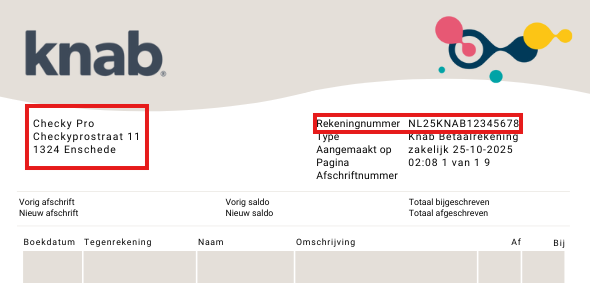
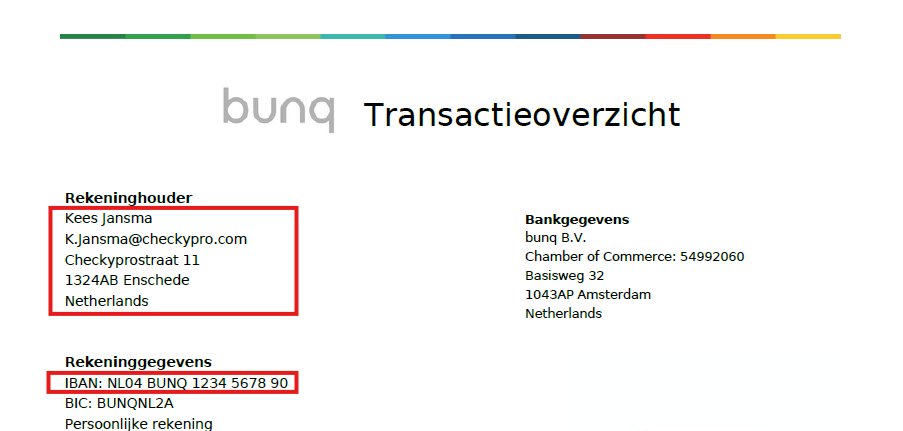
Your Proof of Bank Account must be an **official document** from your bank showing the account holder’s **full name, address,** and account **number (IBAN)**. Only **bank-issued statements** or **confirmation letters** are accepted **no screenshots** from apps or **partial documents**.
**Example:** Business bank statement.
 **Example:** Personal bank statement.
 ## 41.3 Accepted documents
The following document types are **approved** as Proof of Bank Account.\
Requirements differ slightly between **business** and **personal** accounts:
### **For business documents**
* **Official bank statement** or **account confirmation letter** from the bank
* Must clearly show:
* The **company’s registered name**
* The **business address**
* The **full IBAN or account number**
* Must be **issued within the last 3 months**
* Preferably uploaded as a **PDF file** for maximum readability
The **company name** must match **exactly** with the **name registered in your onboarding details.**
### **For personal documents**
* **Personal bank statement** or **account confirmation letter** from the bank
* Must clearly show:
* The **account holder’s full name**
* The **residential address**
* The **full IBAN or account number**
* Must be **issued within the last 3 months**
Preferably uploaded as a **PDF file** for maximum clarity
## 41.4 Rejected documents
The following documents **cannot** be accepted as proof of bank account:
* **Screenshots** from mobile banking apps
* **Cropped or edited** statements missing key details
* **Transaction overviews** or balance-only pages
* **Invoices or receipts** from purchases
* **Statements older than 3 months**
* **Documents without account holder name or IBAN**
**Third-party accounts** not owned by the company or verified individual
**All documents** must be **official**, recent, and clearly display name, ****address****, and **account number**.
## 41.5 Final notes
Providing a valid Proof of Bank Account helps ensure that payouts are processed smoothly and securely to the correct entity.
Before uploading, make sure that:
* The document is **official** (issued by your bank within the last 3 months)
* The **name, address, and account number** are all visible and match your onboarding information
* The file is uploaded as a **PDF** or **clear full-page image**
Once submitted, our compliance team will review and confirm acceptance during onboarding.
A clear and accurate Proof of Bank Account ensures fast approval, prevents payout delays, and keeps your account fully compliant with Checky Pro’s acquirer partners.
# 42. Proof of domain ownership
Source: https://docs.checkypro.com/KYCKYB/Proof-of-domain
Provide proof of your domain ownership to meet the KYC/KYB verification requirements.
## 42.1 Introduction
As part of the website verification process, every merchant must provide **proof of domain ownership**.\
This confirms that the website used during onboarding is officially owned or registered by the same company applying for a Checky Pro account.
This step helps prevent fraudulent applications and ensures that all merchants process payments only through domains that belong to their registered business.\
\
Submitting a **valid domain invoice** or **purchase confirmation** allows our compliance team to verify ownership quickly and move your onboarding process forward without delay.
## 42.2 Documents required
Your **proof of domain** must show the **company name** and the **domain provider** where the domain was purchased.\
\
he document must be an **official invoice** or **order confirmation**, not a **screenshot** of your website or a **WHOIS lookup**.
### Example

 ### Accepted documents
The following documents are **approved** as valid Proof of Domain:
* **Official domain purchase invoice** from a verified provider (e.g. GoDaddy, Namecheap, Hostinger, Cloudflare, Google Domains)
* Must include your **company name** (matching the onboarding details)
* Must include the **domain name** (e.g. [yourstore.com](http://yourstore.com))
* Must clearly show the **domain provider’s name and logo**
* Must be **recent and valid** (not expired)
* uploaded as a **PDF** for full clarity
*If the domain is registered under a parent company, please ensure the ownership can still be linked clearly to the same legal entity registered in onboarding.\_Rejected documents*
### Rejected documents
The following **cannot** be accepted as proof of domain ownership:
* **Screenshots of the website** or backend pages (e.g. Shopify, Wix, WordPress)
* **WHOIS lookup results** or external domain search pages
* **Invoices without the company name**
* **Expired domain invoices**
* **Informal payment confirmations** (e.g. PayPal receipts without provider details)
* **Edited or incomplete invoices**
## 42.3 Final notes
Providing a valid Proof of Domain ensures a smooth and fast onboarding process.\
It allows Checky Pro and our acquiring partners to confirm that your store operates under a legitimate, verifiable website domain.
Before uploading, make sure:
* The document is **official** and includes both the **company name** and **domain provider**
* The **domain name** is clearly visible
* The file is uploaded as a **PDF** or **clear full-page screenshot** of the invoice
Once submitted, our compliance team will review your document directly in the onboarding flow and confirm acceptance.
A verified domain is essential for ensuring transaction safety, transparency, and trust between your business, your customers, and Checky Pro.
# 39. Proof of identity & address
Source: https://docs.checkypro.com/KYCKYB/Proof-of-identity
Provide the required identity documents for successful KYC/KYB verification.
## 39.1 Introduction
As part of the onboarding process, every ultimate beneficial owner (UBO) or company director must submit **proof of identity** and **proof of residential address**.\
\
This verification step is required by our acquiring partners to comply with **Know Your Customer (KYC)** and **Anti-Money Laundering (AML)** regulations.\
\
These documents confirm that the individuals behind the business are legitimate and that their personal details match the information submitted during onboarding.\
\
Submitting clear, valid, and recent documents ensures your application is processed quickly, while missing or incorrect files can lead to unnecessary delays or rejection.
## 39.2 Document requirements
Your proof of identity and address must clearly show your **full name and residential address**.\
Only official or financial documents are accepte, **no** **personal memberships**, **store receipts**, or **informal letters**.
### Accepted documents
The following document types are **approved** for proof of identity and address:
Screenshots or photos are not accepted under any circumstances.
**Bank statement** (personal account only, not business)
* Must show: your **full name** and **residential address**
* Should be issued by your bank within the **last 3 months**
* uploaded as a **PDF file** for best visibility
**Utility bill** (personal, not business)
* For example: **electricity**, **water**, or **internet** bill
* Must include your **name** and **address**
* Must be **recent (within 3 months)** and fully readable
* Preferably uploaded as a **PDF file** for best visibility
**Official government document**
* Such as a **tax letter**, **residence permit**, or **municipality registration letter**
* Must include **your name**, **address**, and **issue date**
Always ensure that all text is fully visible, not cropped, and clearly readable.\
Documents older than 3 months cannot be accepted.
### Documents that will be rejected
The following documents **cannot** be accepted as valid proof:
* **Receipts** or **invoices** from stores or purchases
* **Membership bills** (e.g., football clubs, gyms, or associations)
* **Business-related invoices** (proof must come from your personal account)
* **Documents without an address or full name**
* **Documents older than 3 months**
* **Screenshots or images that are unclear or cut off**
All documents must be official, clearly display both name and address, and be readable in full.
## 39.3 Final notes
Providing the correct proof of identity and address helps complete your onboarding quickly and prevents unnecessary back-and-forth during verification.
Make sure that:
* The document is **official and recent** (issued within the last 3 months)
* Your **name and address** are fully visible
* The file is uploaded in **PDF format** or as a **clear, uncropped image**
Once submitted, our compliance team will review your document and confirm acceptance within the onboarding flow.
A clear, valid proof of identity not only speeds up approval but also builds long-term trust and compliance with our acquirer partners.
# 44. Supplier history
Source: https://docs.checkypro.com/KYCKYB/Supplier-history
Submit your supplier history to support the KYC/KYB verification of your business.
## 44.1 Overview
As part of our onboarding and risk review process, merchants are required to provide **Supplier History** to verify the legitimacy and continuity of their business operations.
This documentation shows that your company is actively purchasing inventory or fulfilling orders through real, verifiable suppliers.\
It also helps confirm that your **sales activity** and **supply chain** match the processing history provided during onboarding.
Providing valid supplier history helps our compliance team confirm that your business operates transparently and reduces potential risk during acquirer review.
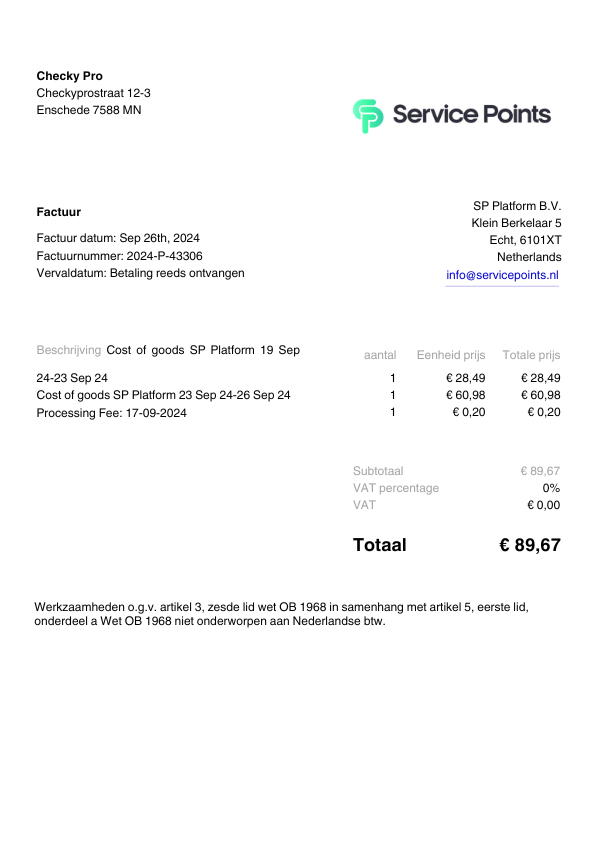
## 44.2 Example
Your Supplier History should show at least 1 month of recent purchase history that aligns with your processing history. All documents must clearly show that the purchases were made under your company name and address.
 ## 44.3 Accepted documents
The following documents are **approved** as valid supplier history:
* **Supplier invoices** or **purchase receipts**
* Must show your **company name** and **business address**
* Must clearly display the **supplier’s name**, **invoice date**, and **purchased products/services**
* Must cover **at least 1 month of consistent history** that matches your declared processing activity
* Can include multiple invoices from the same supplier if they collectively show at least one month of activity
* Preferably uploaded as **PDF files** for readability and authenticity
The more complete and recent your supplier history, the faster your application can be approved.
## 44.4 Rejected Documents
The following documents **cannot** be accepted as valid supplier history:
* **Excel or spreadsheet lists** created by the merchant
* **Self-generated invoices** or unverified order overviews
* **Screenshots** from supplier portals without full invoice details
* **Invoices without company name, address, or supplier details**
* **Invoices older than 6 months**
* **Purchase records not related to your business operations**
*Only official supplier invoices or statements are accepted, internal summaries or spreadsheets are not valid.*
## 44.5 Final notes
Valid supplier history helps confirm the authenticity of your business operations and ensures a faster approval process.
Before uploading, make sure that:
* The documents are **official supplier invoices or receipts**
* They show your **company name and address**
* They cover **at least 1 month** of purchase history aligned with your processing history
* Files are uploaded as **PDFs**, not Excel or text files
Once submitted, our compliance team will review your supplier history to verify your business activity. Providing clear and consistent supplier records helps build trust and speeds up onboarding with Checky Pro’s acquirer partners.
# 38. Website requirements
Source: https://docs.checkypro.com/KYCKYB/Website-requirements
Learn the required website details and policies needed to meet KYC/KYB compliance and complete onboarding successfully.
## 38.1 Introduction
Before your account can be approved by our acquiring partners, your website must meet specific compliance **requirements**.\
\
These standards come directly from international card schemes (Visa, Mastercard, etc.) and are verified during every **onboarding review.**
A compliant website ensures:
* **Transparency** for customers and acquirers
* **Reduced risk** of chargebacks or disputes
* **Faster approval** during the KYB/KYC process
In short, your website is not only your storefront, it’s your digital proof of legitimacy.
## 38.2 Terms and Conditions
Your company details must always be included in your **Terms and Conditions**.\
This is the **official location** for your company information.
### What your Terms and Conditions page must include
Your **Terms and Conditions** page forms the legal foundation of your online business.
It must clearly present your **company’s official details** and accurately reflect your ownership and responsibility.
This ensures **full compliance** with acquirer and card scheme requirements. acquirer and card scheme requirements, your **Terms and Conditions page** must clearly display the following:
1. **Registered company name** (exactly as stated on your registration document, website name is not accepted)
2. **Business address** (street, postal code, city)
3. **Company registration number** (e.g., KVK number or equivalent)
4. **Governing law and jurisdiction**
5. **Business email address** (preferably matching your domain, e.g., [info@yourstore.com](mailto:info@yourstore.com))
Your website must not contain any text suggesting that it is **managed**, **operated**, or \*\*owned \*\*by another \*\*company \*\*or **third party**.\
\
All references of this kind must be removed or replaced with your own **registered company name** to ensure \*\*transparency \*\*and **compliance**.
### What your Terms and Conditions page must not include
A well-structured **Terms and Conditions** page is essential for compliance and onboarding approval.\
It provides transparency to both customers and acquirers and helps prevent **unnecessary delays** during verification.
To prevent **delays** or **rejections** during onboarding, make sure your **Terms and Conditions** do not contain:
* **A website name used as the business name** (e.g., “YourStore.com” instead of your registered company name)
* **Missing or fake** address or registration number
* **Copied content** from another company or template without modification
* **Incorrect governing law or jurisdiction** that doesn’t match your country of registration
* **References to another brand or store** that are unrelated to your company
* **Incomplete contact information** (no email or address visible)
### Final notes
Your Terms and Conditions page is a legal **requirement** for all merchants using Checky Pro Payments.\
It acts as the official source of your business information and must be **transparent**, **complete, and consistent** with your onboarding documents.
Once your Terms and Conditions page meets all requirements, **enter your website URL** directly in the onboarding form when completing your Checky Pro registration.
Our compliance team will **automatically review** your website to confirm it meets acquirer standards.
## 38.3 Shipping policy
Your **Shipping Policy** must clearly state your delivery times and conditions.\
This information must always be **consistent** across your entire **website**, from **product pages** to **checkout**.
### What your shipping policy page must include
A **clear** and **accurate Shipping Policy** is required to comply with **acquirer** and **card scheme standards**.\
It ensures that customers clearly understand your **delivery expectations** and that all information across your website remains **consistent**.\
\
The following requirements outline what your **Shipping Policy must include** to meet compliance standards.
To meet ****acquirer andcard scheme**** requirements, your **shipping policy** must clearly display:
1. **Estimated delivery time** (e.g., “2–5 business days”)
2. **Processing time** (e.g., “Orders are processed within 1–2 business days”)
3. **Shipping cost** or a clear statement that shipping is free
4. **Contact email** for delivery or tracking issues
Tip: All delivery times mentioned on **product pages**, **checkout**, and your **Shipping Policy** must match exactly.\
Different or conflicting information is a **common reason for rejection.**
### Final notes
A clear, consistent **Shipping Policy** increases trust for both your **customers** and our **acquiring partners.**\
Make sure all information especially delivery times is realistic, visible, and identical across your entire website.
## 38.4 Refund & Return Policy
Your Refund & Return Policy is a key part of your website compliance review.\
Acquirers and customers must be able to clearly see how your **business handles returns and refunds**, including timelines, conditions, and potential costs.\
\
A compliant Refund Policy shows transparency, helps avoid chargebacks, and ensures your store meets **the legal consumer protection** rules of your region (for example, a **14-day return period in the EU).**
All refund and return information must be **consistent across your entire website**, meaning the same rules, timelines, and contact details must appear on your **product pages, FAQs, and checkout page.**
### Policy Requirements
Your **Refund & Return Policy** must clearly explain how and when customers can return products.\
This information must comply with the **law in your region** and match what is shown elsewhere on your website.
### What your Refund & Return policy page must include
\
Below you will find the **key** elements that must be included on your **Refund & Return Policy** page to meet **compliance** and **acquirer requirements**.
To meet **acquirer** and **legal standards**, your policy must clearly describe:
**Return period** – the time customers have to return a product (must follow the minimum legal period in your country, for example 14 days in the EU)\
\
**Return procedure** – how customers can start a return (for example “Email us within 14 days of receiving your order”)\
\
**Return address** – where the items should be sent.\
\
**Refund time frame** – how long it takes before the refund is processed after receiving the returned item.\
\
**Conditions for returns** – such as packaging requirements or proof of purchase.\
\
**Costs and responsibilities** – whether customers or your business covers return shipping.
If a product needs to be **returned to another country**, this must be clearly communicated **before purchase**.\
\
For example:\
\
If a product must be returned to our supplier in China, the return **shipping fee** may range between €20 and €35 depending on your local courier.\
\
Including this information protects both you and your **customers** from **misunderstandings** or **disputes**.
### What your Refund & Return policy must not include
Avoid the following **common issues** to stay compliant:
No refund or return policy on your website\
\
Return periods shorter than the legal minimum in your country\
\
Hidden or unclear additional fees for returns\
\
Mentioning different refund terms on other pages\
\
Copying supplier or unrelated store policies without adjustment
All refund and return information **must be identical** across your website, **including product descriptions**, **FAQs**, and the **checkout page**.
### Final notes
A clear **Refund & Return Policy** increases customer trust and helps prevent chargebacks or disputes with your payment provider.\
Make sure your return process is **legally compliant** in your operating country, **transparent** about timelines and costs, and **consistent** across all website sections.
## 38.5 Final overview
Your website is one of the most important parts of the merchant onboarding process.\
Before any account can be approved, our acquiring partners must confirm that your online store meets all compliance and transparency standards.
By following the requirements outlined on this page, including:
* **Terms & Conditions** clearly showing your business details
* **Shipping Policy** providing transparent and consistent delivery times
* **Refund & Return Policy** explaining the process, costs, and customer rights
you ensure a smooth and fast review process without unnecessary delays.
Maintaining a compliant and professional website not only helps you get approved faster, it also builds trust with customers, reduces chargeback risk, and improves overall conversion and credibility.
If your website meets all of the above requirements, include your website URL during onboarding.\
Our compliance team will automatically verify everything as part of your merchant review.
# 9. Connect Shopify
Source: https://docs.checkypro.com/getting-started/Connect-Shopify
### 9.1 Overview
This guide explains how to connect your Shopify store to your Checky Pro account.\
Once connected, Checky Pro will sync your store data in real time to provide insights, analytics, and reporting.
### 9.2 Requirements
Before you begin, make sure you have:
1. An active **Checky Pro** account
2. **Admin access** to your Shopify store
3. A **stable internet connection**
### 9.3 Log in to Checky Pro
1. Go to [https://app.checkypro.com/login](https://app.checkypro.com/login)
2. Log in with your Checky Pro credentials
### 9.4 Enter Your Shopify Store URL
1. Locate your Shopify store URL , it should look like:
`yourstorename.myshopify.com`
Copy only the part **before** `.myshopify.com` (e.g. `yourstorename`)
2. Paste it into the input field in Checky Pro
3. Click **Continue**
### 9.5 Authorize Checky Pro in Shopify
1. Log in to your **Shopify Admin**
2. Go to **Settings → Apps and sales channels**
3. Click **Develop apps**
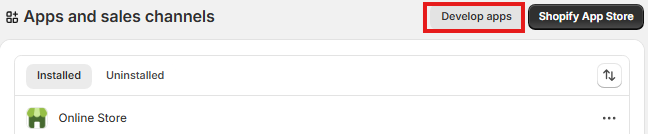 4. Click **Create an app**
5. Enter: **Checky Pro** as the app name
6. Click **Configure Admin API scopes**
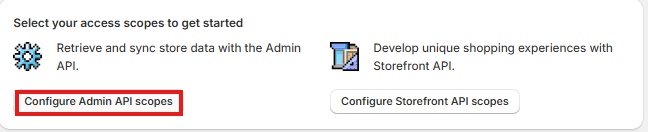 7. Select the following permissions:
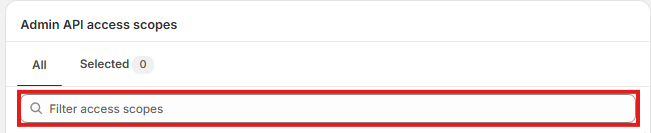 **Customers** → Read & Write
**Discounts** → Read & Write
**Draft orders** → Read & Write
**Orders** → Read & Write
**Products** → Read & Write
**Themes** → Read & Write
8. Click **Save**
9. Click **Install app**
 ### 9.6 Copy API Credentials
1. After installing the app, Shopify will generate credentials
2. Copy the following:
* **API Access Token**
* **API Key**
* **API Secret Key**
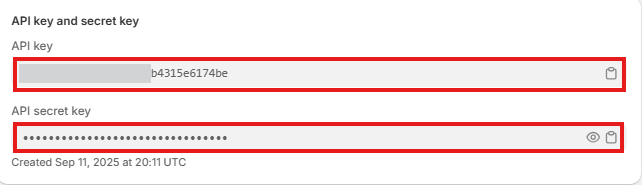
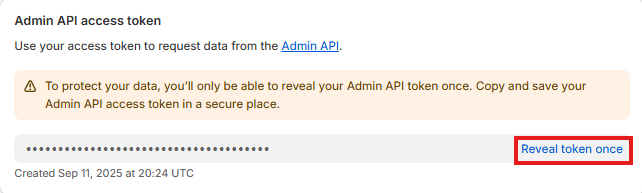 3. Go back to CheckyPro and paste these values into the corresponding fields **(Step 4 of the setup)**
4. Click **Submit & Verify**
**Congratulations, you are all set!**
# 10. Connect Subdomain
Source: https://docs.checkypro.com/getting-started/Connect-subdomain
### 10.1 Introduction
To give your customers a **fully branded checkout experience,** you can connect your own custom subdomain to Checky Pro.\
This allows your checkout to appear under your brand (for example **checkout.yourstore.com**) instead of a generic third-party URL.
Connecting your domain builds **trust, improves conversion rates**, and gives your checkout a professional look.\
You will set this up by adding a CNAME record in the DNS settings of your domain provider (**Shopify, GoDaddy**, **etc.**).
This guide includes:
* A **general explanation** of how the connection works
* A step-by-step guide for **Shopify domains**
* A step-by-step guide for **GoDaddy domains**
## 10.2 General setup overview
Before starting, make sure you have:
* Access to your domain provider’s DNS settings
* A Checky Pro account
* Decided which subdomain to use (for example checkout.yourstore.com)
**Tip: Use a simple subdomain**\
\
We recommend using a clear, short subdomain like **checkout.yourstore.com**, **pay.yourstore.com**, or **shop.yourstore.com**.\
\
Avoid complicated subdomains such **assecure-checkout** or **payment-portal**. The simpler the name, the better your customers will recognize it.
## 10.3 Create subdomain
Create a subdomain within **Checky Pro**
### 1. Add subdomain in Checky Pro
1. **Log in** to your **Checky Pro**.
2. Go to **Settings** → **Custom** **domain**.
3. Fill in the **field**.
**Tip:** Use **"Pay"** or **"Checkout"**, to avoid complicated subdomains
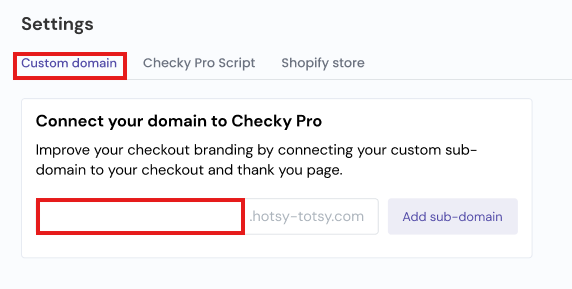 4. Click **Add sub-domain**.
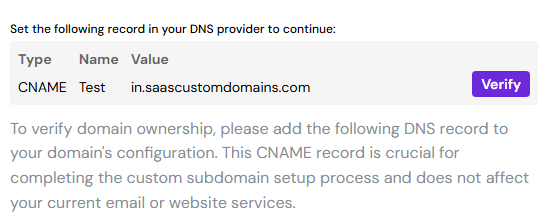
5. After clicking **Add sub-domain**, a verification screen will appear.\
This screen provides a **CNAME record** that you need to add to your DNS settings.
 ## 10.4 Shopify Domains
If your domain is hosted on **Shopify**, follow the steps below.
### 1. Open DNS settings
1. **Log in** to your **Shopify**.
2. Go to **Settings** → **Domains**.
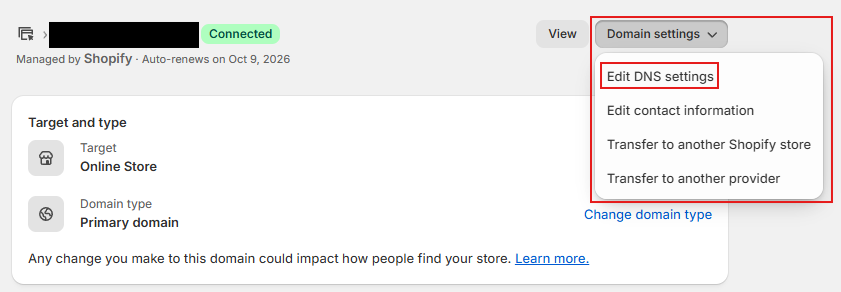
3. Find your **Primary active domain** and select it.
4. Click **Domain settings.**
5. Click **Edit DNS settings**
 ### 2. Create a CNAME record
1. Click **add custom record.**
2. Click **CNAME record**.
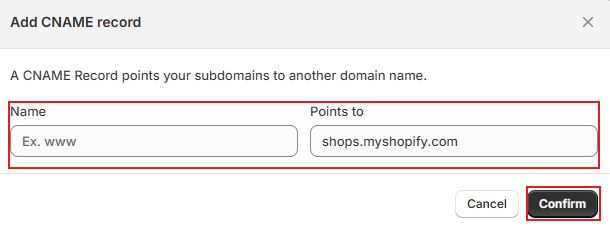
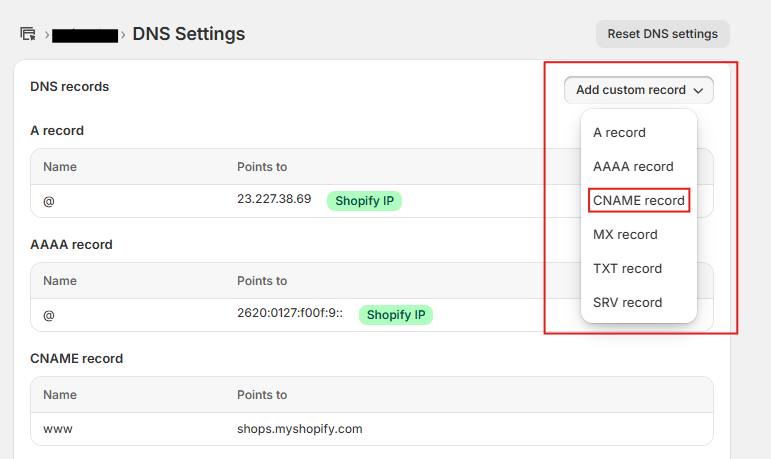 3. Add a new **CNAME record** provided in step **10.3**
**Example:**
 4. Fill in the **fields** and click **Confirm**.
 5. Now go back to your Checky Pro dashboard and click **Verify**.
**Tip:** Common mistake to avoid
Do not point your **CNAME** to your main website domain (for example, [yourstore.com](http://yourstore.com)). It must point to **in.saascustomdomains.com**, otherwise your checkout will not work.
## 10.5 GoDaddy Domains
If your domain is hosted on **GoDaddy**, follow the steps below.
### 1. Open DNS management
1. Go to [https://www.godaddy.com/](https://www.godaddy.com/) and **log in** .
2. From the top menu, click your name and choose **My products**.
3. Under **Domains**, select your active domain and click **DNS**.
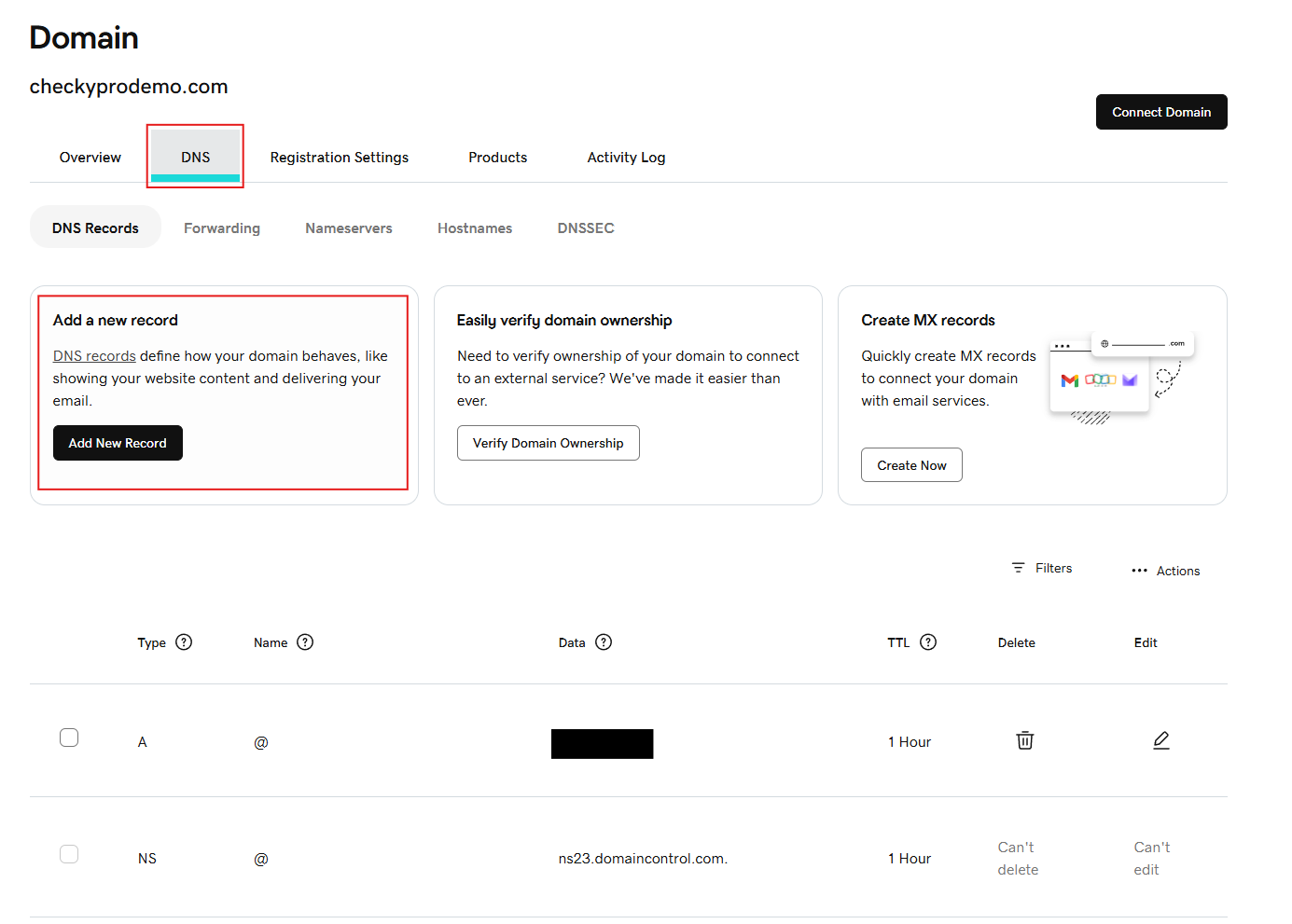 ### 2. Add a CNAME record
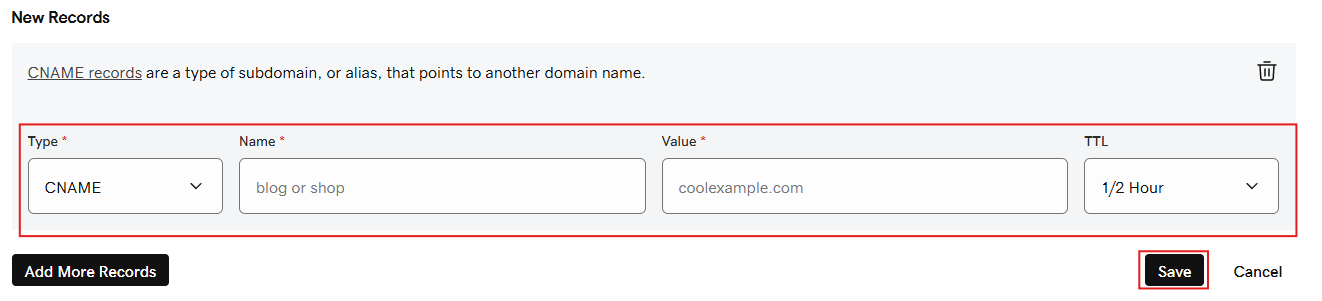
1. In the **DNS records** section, click **Add**.
2. Choose **CNAME** as the record type.
3. Add a new **CNAME record** provided in step **10.3** and click **Save.**
**Example:**
 4. Now go back to your Checky Pro dashboard and click **Verify.**
**Tip:** Keep DNS clean\
\
If you already have an old **“checkout**” record in your **DNS**, remove or replace it before adding the new **CNAME**.\
Duplicate records can cause conflicts and prevent verification.
###
## 10.6 Troubleshooting (if verification fails)
If your subdomain doesn’t verify after a few hours, check the following:
* Confirm your CNAME record points exactly to **in.saascustomdomains.com**.
* Ensure there are no **duplicate** DNS records for the same **subdomain**.
* Wait a little longer, some DNS providers take up to **24 hours** to update globally.
* Try clearing your \*\*local \*\*DNS cache or testing your domain using **dnschecker.org.**
If you still have issues, contact **Checky Pro** support with a \*\*screenshot \*\*of your DNS record for assistance.
## 10.7 Final notes
Connecting a custom subdomain allows your checkout to appear fully branded, giving customers a smooth and trustworthy payment experience.\
Make sure your DNS record is correctly formatted, saved, and verified inside your Checky Pro dashboard.\
Once connected, your checkout will automatically be live under your own domain.
# New file
Source: https://docs.checkypro.com/getting-started/Create-account
Description of your new file.
# New file
Source: https://docs.checkypro.com/getting-started/Next-steps
Description of your new file.
# New file
Source: https://docs.checkypro.com/getting-started/Overview
Description of your new file.